


A customer record has one field that takes everything. It is called "Notes", and it says: "pergola 4×5, anthracite, 2 side walls, LED, see Tuesday's e-mail".
The CRM is fine. It holds contacts, dates and who last phoned whom. What isn't fine is that the most important thing the customer wants lives in a note. You can't search it, you can't add it up, and a colleague in production first has to work out which Tuesday is meant.
A CRM for made-to-order manufacturers has to hold the brief next to the contact: model, dimensions, colour, accessories, the basis of the price and a link to the design. With treede, the brief travels from the configurator into treede CRM as a specification nobody retypes.
The note nobody can search
In made-to-order sales the brief gets lost in these places:
- The brief is retyped. A dimension from an e-mail into the CRM, from the CRM into the quote, from the quote into the production order. Every retyping is a chance for a typo that only the installer finds.
- A note can't be searched. "Which open enquiries are for a pergola over 5 m?" While the dimensions sit in text, the CRM can't answer, and the salesperson goes through enquiries one by one.
- You can't see which price list the price came from. The March quote came from one price list, the April quote from another. When the customer comes back, nobody knows which one applied.
- Production reads someone else's inbox. A colleague in production gets "see e-mail" and goes looking for the brief in the salesperson's mailbox.
- The status doesn't say what it is about. "Quote sent" doesn't say for which model, which dimensions or what price.
Nobody is doing anything wrong here. A CRM is bought for contacts and dates, and that is exactly what it does.

What a CRM for made-to-order manufacturers has to hold besides the contact
Besides the contact, a made-to-order job has five things that should have fields of their own, not a note:
- The brief: model, dimensions, colour and accessories.
- The price and its basis: the amount, whether it is an estimate or firm, and which price list it came from.
- A link to the design: what the customer actually saw and sent.
- The site survey: what was checked on site and what changed against the brief.
- Status and next step: who gets in touch with whom, and when.
A configuration can be saved to treede CRM with its specification, contact and a link to the design. We confirm further fields and steps at deployment. In the demo of treede CRM you will see work with a contact, a configuration and a deal.
Five steps from a 3D design to a deal
The customer enters dimensions and options themselves
In the configurator they choose model, dimensions, colour and accessories. Every change shows on the 3D model, so the brief doesn't come from a guess in an e-mail.
The rules apply before the enquiry exists
The configurator checks the rules within the agreed scope and works out the price from your price list. A combination that can't be built never reaches the CRM.
Sending creates a deal
A submitted configuration can be saved to treede CRM as a deal with a contact, a specification and a link to the design. Not as an e-mail that has to be read first and then retyped.
The salesperson starts with the second e-mail
Dimensions, options and price are already in front of them. The first e-mail full of questions disappears. The salesperson writes the quote straight away, or books the site survey.
The site survey adds to the deal, it doesn't rewrite it
What the technician finds on site belongs to the same deal. During implementation, we set up which fields the site survey fills in. Production then opens one record and doesn't hunt through e-mails.
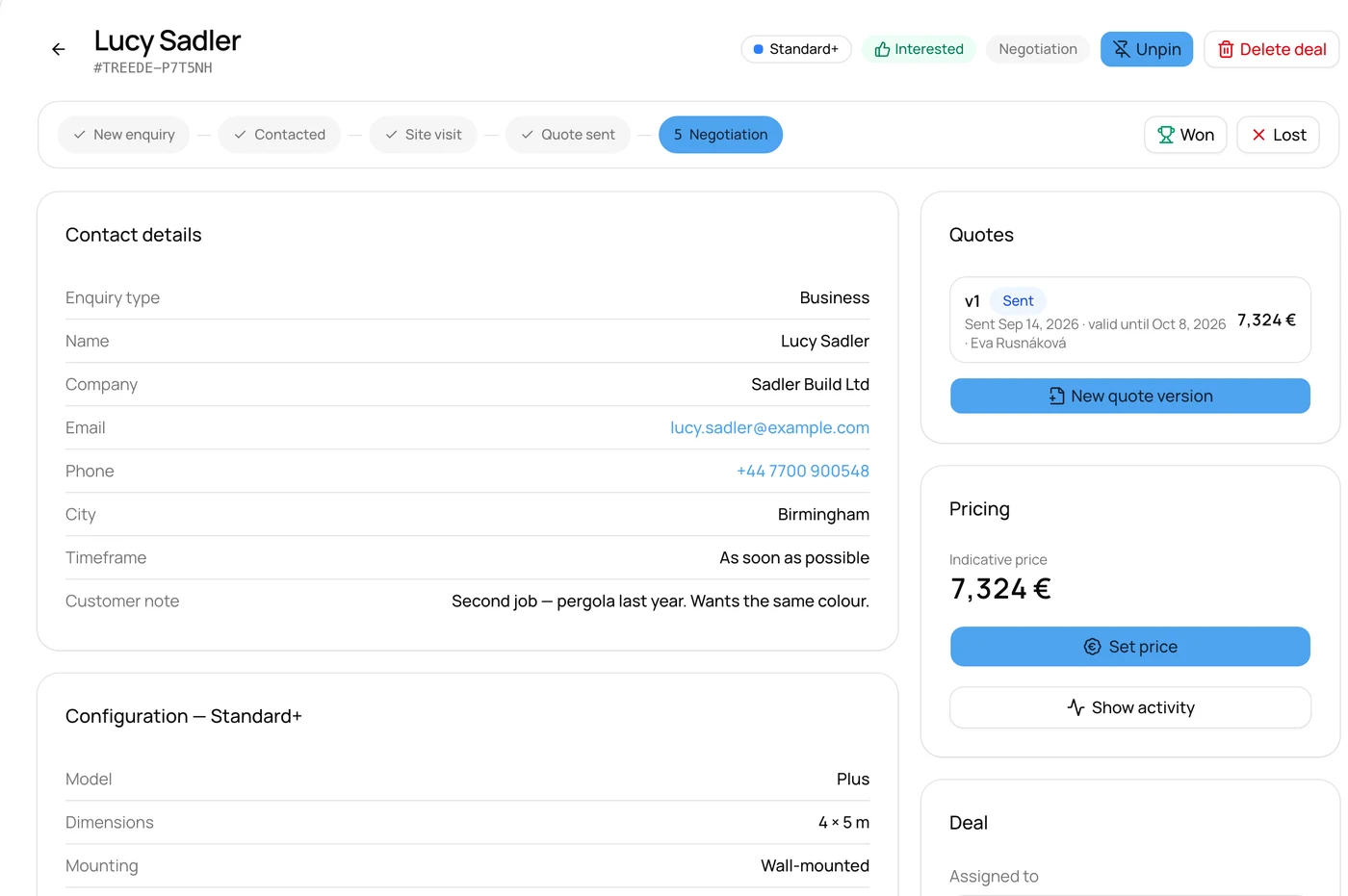
The picture shows a sample enquiry in treede CRM. The names, company and amount are made up.
What if you already have a CRM
You don't have to change it. The configuration can carry on into your system, but a connection is designed individually, around its interface, and we assess it before pricing. It isn't a catalogue of ready-made connectors, and today it is not a ready-made standard feature.
What interface each system has is described on the integrations pages, for example RAYNET CRM.
When not to move the brief into fields
Not every firm needs it. In these situations a note in the CRM is fine:
- There are only a few jobs and one person knows them. They keep each one in their head from enquiry to installation and nothing gets lost.
- You sell finished models with no dimensions. The customer picks from your range and nothing is worked out to measure. An ordinary CRM with a model field is enough.
- Your CRM already has fields for dimensions and the team fills them in. Change nothing. All that is missing is carrying the brief over from the enquiry.
If you didn't recognise yourself in any of these, carry on.
A five-minute test: is it time?
Open the last three jobs in your CRM and answer four questions:
- Can you find every open enquiry for a pergola over 5 m? If not, the dimension is in a note.
- Can a colleague in production open the brief without the salesperson's e-mail? If not, the brief lives in one person's mailbox.
- Can you say which price list March's quote came from? If not, the basis of the price isn't written down anywhere.
- Do you retype the same dimension more than once? Every retyping is a typo waiting for the installation.
The first step takes five minutes and doesn't need us: on the three jobs, mark which details are in a field and which in a note. What is in a note is your first brief.
Which products feel it most
It shows most where a job stands on dimensions and accessories:
- Pergolas and carports: dimensions, roof type, louvres, side walls and lighting.
- Fences and gates: side lengths, corners, height, infill and gates.
- Verandas and conservatories: floor plan, roof pitch and glazing.
- Garden sheds and saunas: dimensions, layout, cladding and extras.
The full list of 305 product types is in the configurator catalogue.
What it looks like in practice
For Moja Pergola the configuration passes from the configurator into the CRM, where the team prepares quotes and manages every deal. The system now brings in hundreds of enquiries a month, and 16% of them became installations. That is the result of the whole path, not of the configurator alone.
Frequently asked questions
Will treede CRM replace our CRM?
In the demo of treede CRM we show work with contacts, configurations and deals. We agree how far your team uses it according to how you sell. A connection to your existing CRM or ERP needs a separate assessment and is not available today as a ready-made standard feature.
What should I look for when choosing a CRM for made-to-order manufacturing?
Fields where the brief can be recorded in a structured way: a dimension as a number, a model as a choice. Access for production and the site survey. And whether you can search by those fields. We don't pick a particular system for you.
What about an enquiry that arrives by e-mail, not from the configurator?
The brief has to be pulled out of it into the same fields. What an enquiry should contain is the subject of What a made-to-order enquiry should contain.
What now
And the "Notes" field? It stays for what it is for: the extra sentence. The brief gets a place of its own, one that production can see too.
You get a look at treede CRM during the call, free of charge. See the pricing.